Frequently asked questions
Everything people ask before they try EstiMate — in plain English. Anything missing? Email support@esti-mate.app.
What EstiMate is
What is EstiMate?
EstiMate is quoting, contracts, project management, invoicing and accounting software for UK builders and tradespeople. You price the job, send a quote the client accepts online, turn it into a contract and programme, run the job with site records and variations, invoice and get paid, and see your P&L, VAT and CIS in the Accounts tab. It runs on the web and as an iPhone app.
Who is it for?
Sole traders and small to mid-sized firms: builders, electricians, plumbers and heating engineers, roofers, joiners, plasterers, landscapers, kitchen and bathroom fitters, decorators, and main contractors doing commercial fit-out. EstiMate Corp adds team seats for larger contractors.
Who makes it?
EstiMate is built by Dave Groom, a tradesman turned contracts manager and founder of Tatton Projects, a design-and-build firm in Cheshire. It started as the spreadsheet his own company quoted from.
Is EstiMate the same as other products called esti-mate or EstiMate?
No. EstiMate at www.esti-mate.app is the cloud quoting, contracts and accounts app for UK builders, made in Manchester by Dave Groom of Tatton Projects. It is not the Windows desktop estimating program sold as "esti-mate", and it is not the iPhone app "EstiMate – Quotation Partner". Those are separate products from other companies. EstiMate's own profiles are LinkedIn (esti-mate-app), Instagram (@estimate.app.uk), TikTok (@estimate.app) and YouTube (@estimate-app).
Is it UK-specific?
Yes. VAT (including reverse charge and 5%/0% rates), CIS deductions, JCT/NEC-style valuations, UK building terminology, £ pricing and UK trade day rates are built in. A US mode switches to sales tax and US terminology.
Quoting and AI
How does the AI quote writer work?
Describe the job in plain English (or upload drawings, a walk-round voice note and photos). The AI drafts the scope, material categories with quantities and prices, labour packages and a programme, using your own day rates and your quote history. You review and edit everything before it goes near a client.
Does the AI learn my prices?
Yes. Quote memory records every material price, labour package and margin from every quote you write — on the web, the phone or imported from old documents, whether it won or not — and feeds it to the AI so drafts match how your business prices. The material autocomplete suggests your last price for any item.
Can I import my old quotes?
Yes. Upload PDFs, photos of a paper quote book, Excel breakdowns or Word documents and EstiMate rebuilds each as a live job with the same items, prices and total, keeping the originals attached.
Can clients accept a quote online?
Yes. The quote link opens on any phone with no login. Clients can accept, decline or request changes, pick optional extras, pay a deposit by card and later sign the contract. You see every response on the job.
Can I choose what the client sees on a quote?
Yes. On each job you switch the materials breakdown, the labour breakdown and the programme on or off for the client. A breakdown you hide is left off the online quote and the PDF, and your own costs are still tracked inside the app.
Can I add a markup without the client seeing my costs?
Yes. Add a client markup to materials and to labour, and set your overheads and company fee as a percentage. They are built into the prices the client sees, so the quote adds up and your markup isn't shown, unless you choose to show overheads or the fee as its own line. Inside the app you keep seeing your true costs and your margin.
Where do EstiMate's material prices come from?
Your own prices first: every priced line you save goes into your own price list, and AI quotes use it before anything else. Where you have no price, current UK trade prices are used as a guide and the line is marked Check so you put your own in. Paste a Howarth Timber or Huws Gray product link into a line and its price is refreshed every night.
Does an AI quote come with a materials list?
Yes. Every AI quote and take-off lists each material with its size, quantity and price, and the Material order pack groups the same list by merchant, ready to print or order from.
Can I add more work to a quote I've already priced?
Yes. Run the AI quote writer again on the same job and describe only the extra work: it adds to the quote you already have and removes nothing. Or add it yourself, or offer it as an optional extra the client can tick. Once the client has accepted, extra work goes in as a variation for them to approve.
Does EstiMate tell me which building regulations apply?
As guidance, yes: a Building regs page and a tab on each job show the Approved Documents that usually apply to that kind of work, how it's approved and the certificates to keep, and the AI names them in quotes. What the work must meet is set by the drawings and specification from the architect or structural engineer, approved by building control, so EstiMate never gives timber sizes, U-values or insulation thicknesses the drawings don't.
What happens to quotes I don't win?
Mark them 'Didn't win' (or the client declines on the link) and they move to their own tab with everything kept — pricing, documents and client — for reference, for quote memory and for the day the client comes back. They're reported separately on the Business, Reports and Accounts tabs and excluded from revenue.
Contracts, jobs and site
Does EstiMate produce a contract?
Yes. A build contract is generated from the accepted quote with your payment terms, delays, responsibilities, insurance, guarantee and dispute wording; the client signs online and both sides get a copy. Variations become signed addenda.
How are variations handled?
Price the additional works from site, send the client a one-tap approval link, and the contract total, invoices and reports update automatically with an audit trail. Clients can also pick optional extras on the original quote.
What site records does it keep?
Site diary with weather and workforce, RFIs, non-conformance reports, quality inspections, snagging with numbered pins on drawings and photos, site photos, drawings with mark-up, 360° tours, progress reports and worker time logs.
Can my workers use it?
Yes. Share a job with a worker by QR code or link — their portal lets them log time, expenses, photos and site diary entries for that job without a full account. Team seats with roles are on EstiMate Corp.
Money
Does it do invoicing?
Yes. Raise client invoices on each job, email them with a branded PDF and a pay-online link, and track invoiced, paid and owed across the business. Overdue invoices are chased automatically if you turn that on.
Can clients pay by card?
Yes — deposits and invoices can be paid online through Stripe on the EstiMate plan and above. Money goes to your connected Stripe account.
Is EstiMate an accounting package?
The Accounts tab gives you a Profit & Loss for any period, a VAT return helper, the CIS register, aged debtors with one-tap chasing and bank statement reconciliation — all built from the jobs, invoices, receipts and wages already in the app. Year-end exports go to your accountant.
How does it handle VAT?
Set your company VAT rate and override per job (20%, 5%, 0% or reverse charge). Quotes, invoices and the VAT helper use the right treatment, and reverse-charge invoices carry the required wording.
Plans, data and support
How much does EstiMate cost?
Free for up to 3 jobs a month. EstiMate is £15.99 a month for unlimited jobs, branded PDFs, contracts and payments. EstiMate Pro is £39.99 a month and adds the AI suite and Construction Copilot. Commercial (from £99) and Corp (from £249) serve tendering contractors and teams. No contracts; cancel any time.
Is there a free trial?
The Free plan has no time limit — use it on real jobs. Pro has a free trial when you upgrade.
Where is my data stored and who owns it?
Your data is yours. It's stored on Supabase (PostgreSQL) in the EU with row-level security so only your company can read it, and files sit in private buckets. You can export your jobs and accounts at any time.
Does it work offline or on site with poor signal?
The iPhone app and web app both work on mobile data; photos and voice notes upload when you have signal. A connection is needed to sync.
How do I get help?
In-app help assistant, email support at support@esti-mate.app, and priority support on Pro and above.
What a finished quote looks like
The price summary, optional extras and payment stages from a sample quote made in EstiMate. The client sees the same quote online and can accept it there.
You choose what the client sees. Show or hide the materials and labour breakdowns, and add your markup so the client sees your selling prices. Your true costs and your margin stay inside the app, for you only.
See the full sample quote →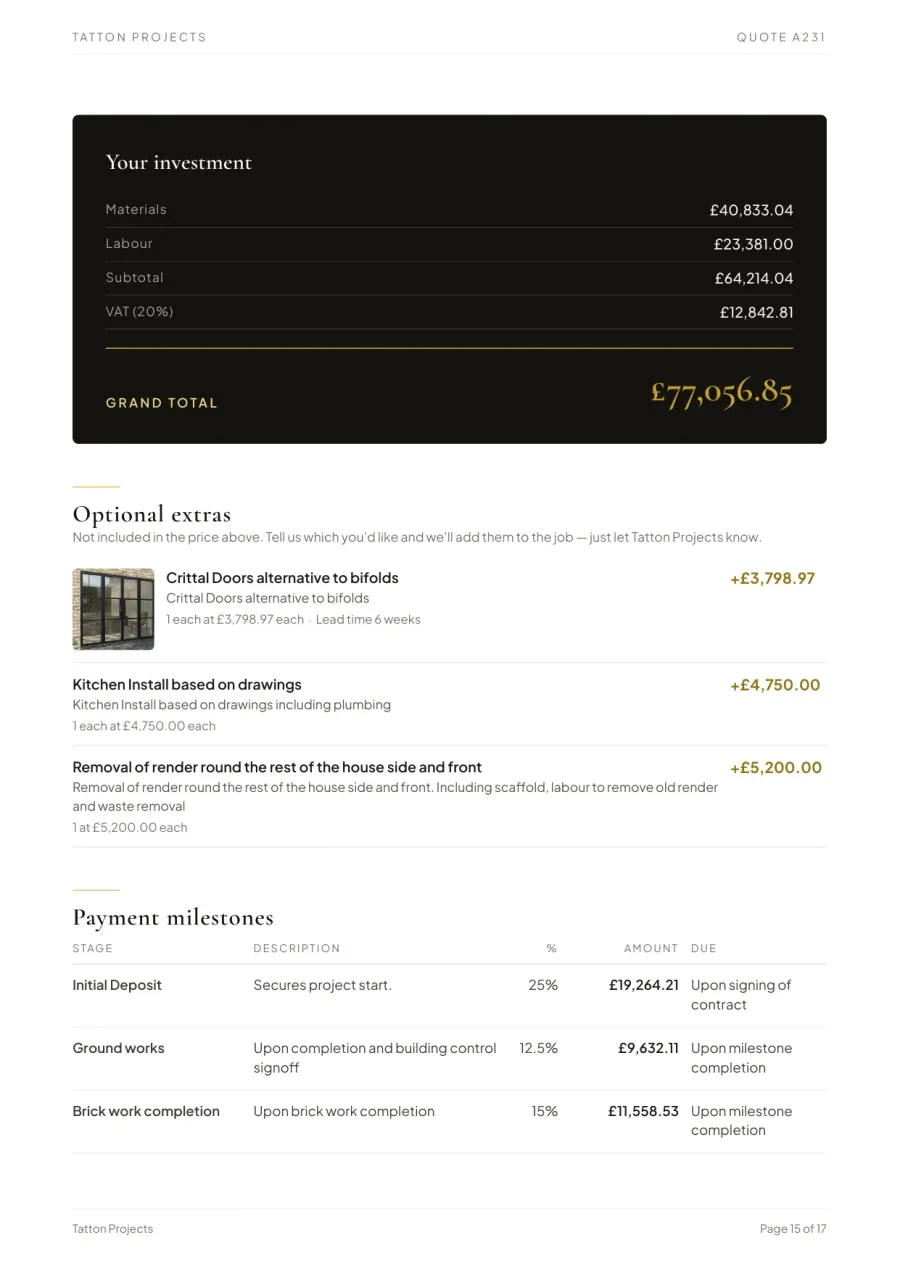
Estimate faster. Run the job. Protect your margin.
Free for your first three jobs a month — no card, no contract.
Try EstiMate freeNo credit card · Free plan always available · Cancel anytime
Rather be shown round first? Book a live demo