Stud partition calculator
Enter the wall length and height and choose the stud centres. The calculator returns studs, noggins, plates, plasterboard sheets for one or both sides and the screws — so a partition is ordered in one trip.
Wall dimensions
Pricing the job? Open EstiMate free and these quantities go straight onto the materials list with your prices.
How it works out the quantities
- 1Studs = wall length ÷ centres + 1, plus extra studs at openings and ends.
- 2Plates = 2 × wall length (head and sole); noggins = one row per 1.2 m of height across every bay.
- 3Plasterboard sheets = wall area ÷ sheet area (2.4 × 1.2 m = 2.88 m²) per side, rounded up with waste.
- 4Screws: about 25–30 per sheet at 300 mm centres on studs and 200 mm on ceilings.
Site tips before you order
- Use 400 mm centres for 12.5 mm board on ceilings and where tiling; 600 mm is fine for walls with 12.5 mm board.
- Door openings need a lintel and doubled studs — add them to the count.
- Acoustic insulation, resilient bars and double boarding are extras; price them as lines.
- Fire-rated or moisture-resistant boards change the sheet spec, not the count.
Common questions
How many studs for a 4 m wall at 400 mm centres?
4 ÷ 0.4 + 1 = 11 studs, plus two for each door opening. Add head and sole plates (8 m) and noggins across 10 bays.
How many plasterboard sheets for a 4 m × 2.4 m wall, both sides?
9.6 m² per side ÷ 2.88 m² per sheet = 3.33 → 4 sheets per side, 8 in total. Allow a spare for cuts around sockets.
400 mm or 600 mm centres?
600 mm suits 12.5 mm board on walls; use 400 mm for 9.5 mm board, ceilings, tiled areas or where the wall carries fixings.
Does it include insulation?
The calculator counts timber, board and screws. Insulation is by area — add it as a material line on the quote.
Related calculators
Plastering calculator
Enter the wall and ceiling areas and choose the system — skim only, board and skim, or two-coat to masonry. Th…
Flooring calculator
Enter the room dimensions and the flooring type, and get the number of packs or square metres, the underlay, a…
Paint coverage calculator
Enter the room size and ceiling height, deduct doors and windows, choose coats and the paint's coverage, and g…
From a quantity to a priced line
The calculator gives you the quantity. In EstiMate that quantity becomes a priced line on the quote, with the working printed underneath so the client can see where the number came from, as on this page from a sample quote.
You choose what the client sees. Show or hide the materials and labour breakdowns, and add your markup so the client sees your selling prices. Your true costs and your margin stay inside the app, for you only.
See the full sample quote →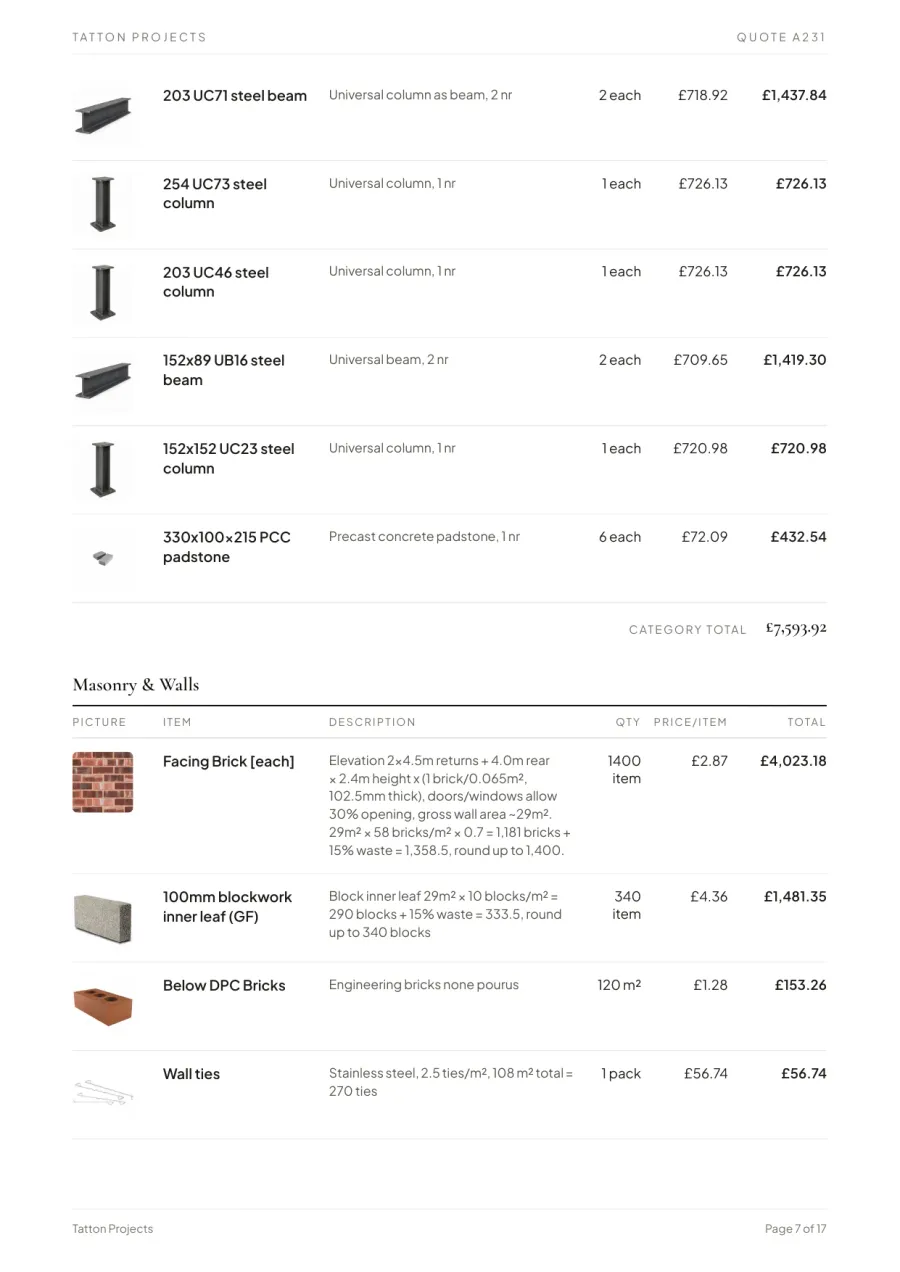
Quantities are half the quote. EstiMate does the other half.
Drop the numbers into a priced, branded quote your client can accept online — free for your first three jobs a month.
Try EstiMate freeNo credit card · Free plan always available · Cancel anytime
Rather be shown round first? Book a live demo